
How Do I Choose a Point-of-Sale System?
How Do I Choose a Point-of-Sale System?
Key Takeaways
- Your business model decides your POS — not the other way around. A full-service restaurant, a boutique, and a mobile contractor need three genuinely different setups. Start with how you take orders and get paid, then shop for hardware.
- Hardware is the small number. Expect roughly $349–$2,100 per device in 2026, plus $14.95–$190 per month in software. Card processing is almost always the largest line item on your statement.
- The contract matters more than the sticker price. A 36-month term with an early termination fee, or a 48-month equipment lease, can quietly triple the cost of a $1,800 terminal.
- Reseller pricing is not Clover.com pricing. Published MSRP applies to direct purchases. Independent sales offices and banks set their own numbers — which can work in your favor or badly against it.
- Ask who answers the phone at 7 p.m. on a Friday. Support quality is the single most under-weighted factor in POS selection, and the one you notice fastest when it’s missing.
The question hasn’t changed. The answer has.
When we first wrote about choosing a point-of-sale system, the landscape was simple enough to fit into three buckets: pen and paper, a bulky all-in-one terminal, or one of the new cloud-based tablet systems that had just started showing up on counters.
That framing held up for a while. It doesn’t anymore.
Today the cloud has won, tablets are a commodity, and the meaningful differences between systems have moved somewhere less visible — into processing rates, contract terms, app ecosystems, and whether your provider picks up the phone. The hardware in front of your customer is now the least interesting part of the decision.
This guide walks through how to actually make that decision in 2026: what the categories are, what things cost, where the traps are, and the specific questions to ask before you sign anything.
Step 1: Start with how your business runs
Before you look at a single device, answer four questions about your own operation. Nearly every downstream choice follows from these.
How do orders reach you? Counter service, tableside, over the phone, on a job site, through a website, or some combination. A system that’s excellent at one is often mediocre at another.
How complex is what you sell? Ten menu items with no modifiers is a different problem than 4,000 SKUs with size and color variants, or a service business with deposits and recurring billing.
Who’s ringing it up? High-turnover seasonal staff need an interface they can learn in twenty minutes. A two-person shop can absorb more complexity.
What else has to talk to it? Accounting software, payroll, online ordering, loyalty, e-commerce, inventory. Every integration you skip becomes manual data entry someone has to do at closing.
Write the answers down. Bring them to every vendor conversation. Most bad POS purchases happen because a business owner walked in asking “which system is best?” instead of “which system fits this?”
Step 2: The four categories that exist in 2026
Legacy on-premise systems. Software installed on a local server in your back office. Still common in large full-service restaurants and specialty retail with deep customization needs. Strengths: works without internet, extremely configurable, no monthly software creep. Weaknesses: high upfront cost, you own the maintenance, and updates are your problem.
Cloud all-in-one systems. Proprietary hardware bundled with proprietary software and integrated payment processing — Clover being the most common example in our client base. Strengths: one vendor, one bill, one support number, and an app market for extending functionality. Weaknesses: the hardware is locked to the platform, so switching later means replacing everything.
Tablet and mobile systems. Software running on an iPad or Android tablet with a card reader attached. Strengths: lowest entry cost, familiar interface, easy to add stations. Weaknesses: consumer tablets aren’t built for a hot line or a dusty shop floor, and battery life becomes a daily annoyance.
Hybrid setups. A countertop station plus handhelds plus a mobile reader, all on the same account. This is where most growing businesses actually land — a fixed station for the register, a handheld for tableside or curbside, and a phone-based reader for the farmers market booth.
You can see the specific device families we deploy on our POS systems and equipment page, and the platform breakdown on our Clover POS page.
Step 3: What a POS system actually costs in 2026
POS pricing has four layers, and vendors tend to quote you whichever one makes them look best. Here’s the whole picture.
Layer 1: Hardware
Published 2026 MSRP for the Clover line runs roughly:
| Device | Approx. purchase price | Best for |
|---|---|---|
| Clover Go (mobile reader) | ~$49–$99 | Trade shows, deliveries, in-home service |
| Clover Flex (handheld) | ~$749 | Tableside, curbside, line busting, small counters |
| Clover Mini (compact counter) | ~$799–$849 | Boutiques, cafés, tight counter space |
| Clover Station Solo | ~$1,699–$1,799 | Single-screen register with drawer and printer |
| Clover Station Duo | ~$1,899–$2,099 | High-volume retail and restaurants; adds customer-facing screen |
| Kitchen Display System | ~$799–$899 + monthly | Kitchens replacing paper tickets |
One important caveat: these are manufacturer-suggested prices for direct purchases. Resellers, banks, and independent sales offices set their own pricing, so a quote from any provider — including us — won’t necessarily match those numbers. Always compare quotes on total three-year cost, not device price.
Layer 2: Software subscription
Every modern POS charges per device, per month. In 2026, plans generally run from about $14.95/month for bare-bones payment acceptance up to roughly $190/month for full-service restaurant tiers with table mapping, coursing, and advanced reporting. Retail tiers commonly land around $85–$105/month once you need real inventory management, variants, loyalty, and employee permissions.
Add a second station or a handheld, and you’re usually paying a second subscription.
Layer 3: Card processing
This is the big one. Card-present rates commonly land in the 2.3%–2.6% + $0.10 range, with keyed-in and e-commerce transactions closer to 3.5% + $0.10.
Run the math on your own volume before you compare anything else. A business doing $40,000/month in card sales is paying somewhere around $1,000/month in processing. A 0.3% difference in effective rate is $120/month — more than the entire software subscription. That’s why we generally tell owners to spend their negotiating energy here rather than on hardware discounts.
How that rate is structured matters as much as the number. Our guide to interchange-plus vs. flat-rate pricing breaks down which model tends to favor which type of business.
Layer 4: Everything else
Add-on apps from the platform’s marketplace (often $10–$30/month each), gateway fees, PCI compliance fees, monthly minimums, chargeback fees, batch fees, and paper. Ask for a sample statement — a real one, with all line items — before you sign.
Step 4: Match the hardware to the counter, not the brochure
A few practical rules we’ve learned deploying these systems across Wisconsin:
Customer-facing screens pay for themselves in tipped environments. When the customer taps their own tip on their own screen instead of watching you flip a tablet around, tip frequency and average tip amount both go up. For restaurants, bars, and salons, this is usually the single highest-ROI hardware upgrade.
Handhelds are about labor, not convenience. A server who fires an order from the table instead of walking to a station saves minutes per table across a whole shift. That’s the actual return, and it’s why handhelds often justify their subscription in a busy dining room.
Offline mode is not optional. Ask specifically what happens when the internet drops: does the system stop, or does it queue transactions and sync when it reconnects? Get the answer in writing. Rural Wisconsin locations should treat this as a hard requirement.
Check the peripheral list. Scale integration for delis, barcode scanning for retail, kitchen printers, cash drawer compatibility. These are cheap to add up front and painful to bolt on later.
Step 5: Read the contract before you read the spec sheet
Most POS regret is contractual, not technical.
Term length and early termination. Many bundled plans require a 36-month commitment with an ETF calculated on the remaining contract value. If you close, relocate, or simply outgrow the system in month 14, you’re often still paying.
Equipment leases are the expensive trap. A station that costs about $1,800 to buy outright can total $4,000–$6,000 across a 48-month lease — and those leases are frequently non-cancelable even if the business closes. If a rep is steering you toward a lease, ask directly what the buyout price is and what the total of payments comes to. Then compare it to buying.
Bundled hardware isn’t free hardware. “No cost terminal” offers usually recover the equipment through a higher processing rate or a longer term. Sometimes that’s the right trade for a business that’s short on cash. Just make sure you know which trade you’re making.
Rate change clauses. Ask whether your rate can be adjusted mid-term, under what conditions, and with how much notice.
Step 6: Ask who actually supports you
When the card reader stops taking chip cards during a Saturday dinner rush, the question is no longer which system has better reporting. It’s who picks up.
Platform-level support handles software bugs and account questions. It does not send someone to your location, doesn’t know your menu, and doesn’t know that your kitchen printer is the flaky one. Local support does.
This is worth pressing on before you buy: What are the support hours? Is there a dedicated rep or a general queue? Is on-site service available, and what does it cost? What’s the replacement process for a failed device — overnight shipment, or three business days?
We’ve written more on this trade-off in local vs. national payment processors.
Step 7: Don’t skip security and compliance
Two things changed the compliance picture recently, and both affect POS selection.
PCI DSS v4.0.1 is fully in force. The future-dated requirements from version 4.0 became mandatory on March 31, 2025, so a 2026 assessment is a full-standard assessment. For most small merchants, the practical impact is stricter password and multi-factor authentication rules, and — if you take payments online — new obligations around the scripts running on your checkout page. Requirements 6.4.3 and 11.6.1 require inventorying and integrity-checking every script on a payment page and detecting unauthorized changes to it. Which self-assessment questionnaire applies to you determines how much of this lands on your plate, and that’s worth confirming with your acquiring bank.
Ask what your POS does to shrink your scope. End-to-end encryption and tokenization mean raw card data never sits on your system, which materially reduces both your breach exposure and your compliance burden. A provider that can’t explain their approach to this in plain language is a provider to be skeptical of.
While you’re at it, understand your exposure on the dispute side too — our chargebacks guide for Wisconsin small businesses covers what a POS can and can’t do to protect you.
Step 8: Test it before you commit
Ask for a live demo using your data — your menu, your top 20 SKUs, your actual modifier structure. A canned demo shows you the happy path. Your data shows you the friction.
Then run the scenarios that break systems:
- A split check across four people, two of them paying by card
- A partial refund on an item bought three weeks ago
- A void mid-transaction
- Closing out and reconciling a shift with cash, cards, and tips
- An offline transaction, followed by reconnection
If it takes the rep more than a minute to do any of these, it’ll take your seasonal hire five.
A quick decision framework
| If you are… | Prioritize | Typical setup |
|---|---|---|
| Quick-service restaurant or café | Speed of order entry, modifiers, kitchen tickets | Counter station + KDS, mid-tier QSR plan |
| Full-service restaurant or bar | Table mapping, coursing, tableside ordering, tip handling | Station Duo + handhelds, full-service plan |
| Retail shop | Inventory with variants, purchase orders, loyalty | Mini or Station Solo, retail growth tier |
| Service business or contractor | Mobility, invoicing, deposits, recurring billing | Handheld or mobile reader + virtual terminal |
| Seasonal or event-based | Low monthly commitment, portability, offline mode | Mobile processing with a lightweight plan |
Industry-specific detail lives on our restaurant and retail solution pages.
Twelve questions to ask any POS vendor
- What is my effective rate, and is pricing interchange-plus or flat?
- What’s the full monthly cost per device, including every add-on?
- What is the contract term, and what’s the early termination fee?
- Is this a purchase or a lease? What’s the total of payments?
- Can my processing rate change mid-term?
- What happens to transactions when the internet goes down?
- Who owns my data if I leave, and can I export it?
- What integrations exist for my accounting and payroll software?
- What are your support hours, and is on-site service available?
- How fast is hardware replacement if a device fails?
- Does the hardware work with any other processor, or is it locked?
- Can I see a real sample statement with every line item?
If a vendor gets cagey on questions 3, 4, 5, or 12, that tells you what you need to know.
Frequently Asked Questions
How much does a POS system cost for a small business in 2026? Budget roughly $800–$2,100 for a single countertop device, plus $15–$105 per month in software depending on tier, plus card processing at roughly 2.3%–2.6% + $0.10 on card-present transactions. A typical single-location small business lands somewhere between $150 and $400 per month all-in, with processing making up the majority of that.
Should I buy or lease my POS hardware? Buy, in almost every case. A device that costs around $1,800 outright can total $4,000–$6,000 over a 48-month lease, and those leases are commonly non-cancelable — including if you close the business. Leases occasionally make sense for cash-constrained startups, but always ask for the total-of-payments figure before signing.
Do I need a POS system, or is a card terminal enough? If you only need to accept payments and your item count is small, a standard terminal may be sufficient and considerably cheaper. You need a full POS once you need inventory tracking, employee management, detailed sales reporting, modifiers, or integrations with other software.
Can I keep my POS hardware if I switch processors? Usually not. Most all-in-one platforms use proprietary hardware locked to that platform, which is one of the real switching costs to weigh before committing. Ask this question explicitly before you buy.
What happens to my POS if the internet goes out? It depends on the system. Better ones queue transactions locally and sync when the connection returns; others simply stop. Get the specific behavior confirmed in writing, especially if your location has unreliable service.
Is Clover a good POS system? It’s a strong fit for many small and mid-sized restaurants and retailers, largely because processing is built in and the app market covers most common needs without custom development. The trade-offs are proprietary hardware and per-device subscriptions. Whether it’s right for you depends on your item complexity, volume, and how much you value having one vendor for everything.
How long does it take to set up a new POS system? A simple single-device setup can go live in a few days. A multi-station restaurant with menu build-out, kitchen printers, and staff training typically takes two to four weeks. Menu and inventory data entry is usually the long pole — start it early.
What’s the difference between interchange-plus and flat-rate pricing? Flat-rate charges one predictable percentage regardless of card type. Interchange-plus passes through the actual network cost plus a fixed markup, which is more transparent and usually cheaper at higher volume, but produces a statement that varies month to month. We break the comparison down in our pricing guide.
Ready to narrow it down?
Choosing a POS system is mostly a process of elimination, and it goes much faster with someone who’s seen how these systems perform in businesses like yours.
Motus Financial has been helping Wisconsin businesses select, deploy, and support point-of-sale systems since 2011. We’ll look at your volume, your workflow, and your current statement, and tell you plainly what fits — including when the answer is “keep what you have.”
Get a no-obligation POS assessment → Or call us directly at (608) 819-8666.
Not sure what a term on your statement means? Our payments glossary decodes the jargon.




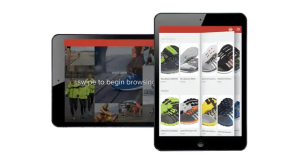
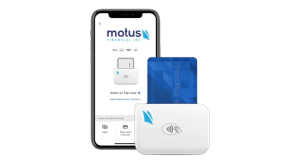
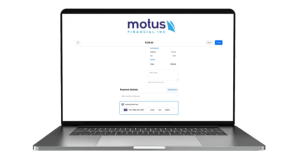
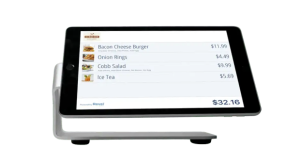 Our POS systems are designed to streamline in-store transactions. With features like inventory management, sales reporting, and customer tracking, our POS solutions help you run your business more efficiently. Our terminals are compatible with various payment methods, including chip cards, contactless payments, and mobile wallets.