
Virtual Terminal Credit Card Processing in Wisconsin
Virtual Terminals
Take Card and ACH Payments From Any Computer
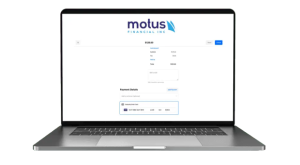
The Motus Financial virtual terminal lets your office take credit card and ACH payments from any computer with an internet connection. Your team logs in to a secure website, enters a payment from a phone call, a mailed order form, or an open invoice, and sends the customer a receipt by email or print. There is no countertop terminal to buy, which makes virtual terminal credit card processing a practical fit for businesses that get paid away from a checkout counter.
We are a locally owned merchant services company based in Sun Prairie, serving businesses across Wisconsin. If you are still deciding between a virtual terminal and a website checkout tool, our guide to choosing a payment gateway or a virtual terminal walks through which one fits your workflow. If a virtual terminal is the right call, this page covers what it does, who it suits, and how to get started.
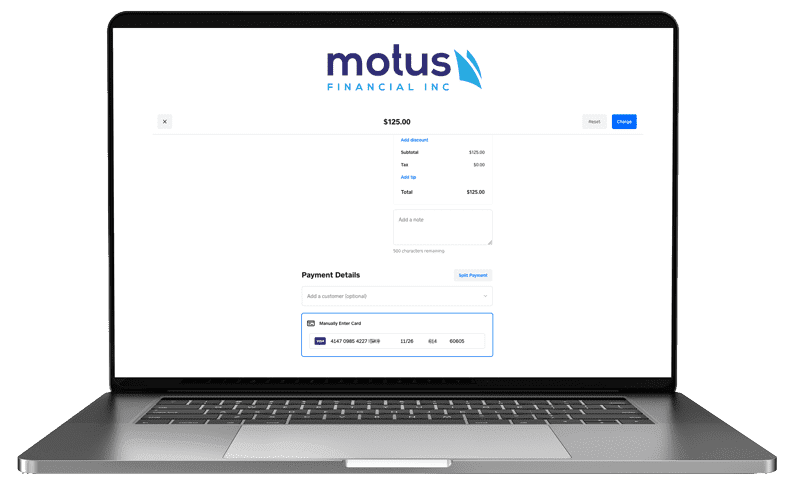

What You Can Do in the Virtual Terminal
Virtual terminal payment processing works through your web browser. With a merchant account from Motus Financial, you use the browser and an internet connection to log in to the virtual terminal’s secure website. Add a compatible USB card reader if you also want to take cards in person at the office. From there your staff can:
- Key in mail order and telephone order (MOTO) card payments
- Enter ACH payments from a customer’s checking or savings account
- Process swiped cards in person with a USB card reader
- Get an authorization response while the customer is still on the phone
- Email or print receipts
- Issue refunds to a customer’s card or bank account
- Securely store (tokenize) card or ACH details for future billing, with the customer’s permission
- Set up automatic recurring charges
- Check the status of any transaction
- Upload batch files
- Run, customize, and save standard reports
Security and Team Access
The virtual terminal runs on a platform built to PCI security standards, so payment details are entered on a protected website instead of being saved in your own files. It also supports multi-user setups, and depending on your account setup, related merchant accounts can be grouped under a single log-in. Your account administrator decides which staff members get access.
A secure platform is one part of PCI compliance. Your business still has its own responsibilities, such as how staff handle card details taken over the phone, and we will help you understand what applies to your setup.
Why Wisconsin Businesses Use a Virtual Terminal
No Extra Hardware Required
If your team has a computer and an internet connection, it can take payments. That makes a virtual terminal a low-overhead way to collect from customers who never visit a counter.
Cards and ACH in One Place
Take credit cards, debit cards, and ACH bank payments from the same login, so the office is not juggling a separate tool for each payment type.
Recurring Billing Without Re-Keying
Store payment details securely with the customer’s permission, then bill on a schedule for memberships, service plans, or payment arrangements.
Reports That Match Your Books
Look up any transaction, issue refunds, and pull standard or custom reports when it is time to match payments to deposits.
Who a Virtual Terminal Is Right For
A virtual terminal is built for payments your staff enters for the customer. These are the Wisconsin businesses we see get the most out of one.
Phone and Mail Orders
Retailers, manufacturers, and distributors that take orders by phone or on mailed forms can key the payment in while the customer is on the line and get an answer right away.
Invoices and B2B Billing
Accounting firms, law offices, consultants, and B2B suppliers can accept card or ACH payment on an open invoice without asking the client to come in. See how we support payment processing for professional services.
Recurring and Membership Billing
Gyms, clubs, associations, and service-plan businesses can store payment details with the customer’s permission and charge on a set schedule.
Healthcare Front Offices
Dental, chiropractic, therapy, and clinic staff can take patient balances over the phone or set up payment arrangements from the front desk. Learn more about credit card processing for healthcare practices.
Contractors Billing From the Office
HVAC, plumbing, electrical, and remodeling companies often take deposits and final balances by phone once a job is scheduled or finished. A virtual terminal gives the office a simple way to do that. Read more about our credit card processing for contractors.
When a Different Tool Fits Better
If you want customers to pay on their own through your website, a payment gateway with online checkout is usually the better fit. Take a look at our online payment options. If your team takes cards in the field, mobile credit card processing is the right tool. Plenty of businesses use more than one.
MOTO and ACH Payments in Plain English
What Is a MOTO Transaction?
MOTO stands for mail order/telephone order. MOTO payments are card payments where the customer is not standing in front of you. They read their card number over the phone or send it on a mailed form, and your staff types it into the virtual terminal.
Because the card is not physically present, a MOTO payment counts as a card-not-present transaction. These generally carry higher card network costs and more chargeback risk than chip or tap payments. Address and security code checks, where your setup supports them, help confirm the card belongs to the person paying. What a MOTO payment costs your business depends on your pricing structure, which a statement review will show.
What Is an ACH Payment?
ACH stands for Automated Clearing House, the US network that moves money electronically between bank accounts. With an ACH payment, the customer gives you their bank routing and account number and authorizes you to debit their checking or savings account.
ACH works well for larger invoices and recurring bills. It usually takes longer to settle than a card payment, and a payment can be returned later if, for example, the account does not have enough funds. The network’s rules, published by Nacha, require the customer’s authorization, so ask us how authorization is captured in your setup before you start.
Virtual Terminal Questions We Hear Most
A virtual terminal is a secure website your staff uses to enter payments for customers. A payment gateway is the technology that passes payment details from a website, app, or software program to the processor, so customers can pay on their own. Many businesses use both. Our payment gateway vs. virtual terminal guide lays out which one fits phone orders, invoices, recurring billing, and website checkout.
No special equipment is needed. You need a computer, a current web browser, and an internet connection. If you also want to take cards in person at the office, a compatible USB card reader can be added. Ask us which readers work with your setup.
It can be, when it is handled carefully. Have staff key the card straight into the virtual terminal instead of writing it down, use stored payment details for repeat billing instead of keeping card numbers on paper, and give each staff member their own login. Your PCI responsibilities depend on how you accept payments, and we can walk through what applies to your business.
Yes. You can store a customer’s card or bank details securely and schedule automatic recurring charges. Get the customer’s authorization first and keep a record of it. Card network and ACH rules apply to recurring payments, and we will help you set it up the right way.
It depends on your card mix, how many payments are keyed in, your ACH volume, and the pricing structure on your account. That is why we do not quote a number until we have seen your current statement. We favor transparent pricing, and our guide to interchange-plus pricing explains how to read what you pay today.
Yes. Your account administrator can add users and decide who has access, and depending on your account setup, related merchant accounts can be grouped under a single log-in. Giving each person their own login is also a good security habit.
Part of our merchant services in Wisconsin, serving businesses statewide.
Get a Free Statement Review
Send us a recent processing statement and we will go through it with you line by line: what the card networks charge, what your processor adds, and whether a virtual terminal, a payment gateway, or both would fit the way you take payments. There is no obligation. Call 608-819-8666 or Get a Free Statement Review online.




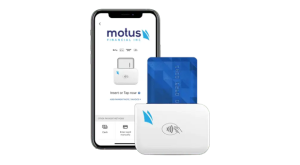
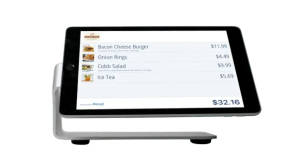 Our POS systems are designed to streamline in-store transactions. With features like inventory management, sales reporting, and customer tracking, our POS solutions help you run your business more efficiently. Our terminals are compatible with various payment methods, including chip cards, contactless payments, and mobile wallets.