
Ecommerce Checkout Checklist for Wisconsin Retailers: Payment Gateway, Fraud Controls, and Reconciliation
Ecommerce Checkout Checklist for Wisconsin Retailers: Payment Gateway, Fraud Controls, and Reconciliation
A customer buys a jacket on your website and returns it at your counter on Saturday. On Monday the refund shows up in the register report but not in the online store, and the bank deposit matches neither. This ecommerce checkout checklist is for the Wisconsin retailer who wants that to stop.
Run it before you open an online store, switch platforms or connect your ecommerce POS system to the register, then again each quarter. For the services side, see our page on ecommerce payment processing in Wisconsin.
Key Takeaways
- List every way customers pay you, online and in store, before you change any tool.
- Confirm in writing that your gateway works with your ecommerce platform, processor and plan.
- Report card-present and card-not-present sales separately.
- Choose fraud controls on purpose, review declines, and never store security codes.
- Reconcile orders, gateway reports, batches, separate payouts and deposits on a schedule.
- Write down who supports each layer before something fails.
Is This Checklist for You?
It fits Wisconsin retailers that sell in a store and online, or are about to, and want retail ecommerce payments to line up with the register: gift and specialty shops, outdoor stores, boutiques, garden centers, and food or liquor stores with an online catalog, who should plan for age checks at pickup. It is most useful when the shelf and the website share inventory.
It is less relevant if you sell only through a marketplace that handles payments for you. If you only take invoice payments, our online payments setup guide is the better starting point.
The Ecommerce Checkout Checklist
1. Checkout methods: map every way customers pay
Start with a plain list: online cards, digital wallets, buy online and pick up in store, phone orders, gift cards, and in-store tap, chip and swipe. Add PayPal or a buy now, pay later option if you offer one. For each one, note which system takes the payment and which records the sale. Gaps show up quickly.
If staff key in orders taken by phone, a virtual terminal for phone and mail orders may fit better than the online store. Our payment gateway vs. virtual terminal guide explains the difference.
2. Gateway compatibility
The payment gateway passes card details from your checkout to the processor. Not every online payment gateway works with every ecommerce platform, plugin version or processor. Confirm it supports your exact platform and plan, the checkout style you will use (a hosted page, embedded payment fields or a full integration), and whether wallets and saved cards work through it.
A hosted page, run by the provider, can simplify setup. See our page on hosted online payment pages. Either way, run test orders, refunds and voids before you go live.
3. Card-present versus card-not-present reporting
A card tapped or inserted at your register is a card-present sale. An online, phone or mail order is card-not-present. The two may be priced differently depending on your plan, so report them separately.
Card-not-present sales also generally carry more fraud and chargeback risk. When an online sale turns out to be fraud, the retailer usually carries the loss, although authentication such as 3-D Secure can change that in some setups. See how chargebacks work.
Ask whether reports split sales by channel or merchant ID, and whether refunds and chargebacks can be filtered the same way. If everything lands in one total, you cannot tell where a problem started.
4. Fraud controls and ecommerce checkout security
The address verification service (AVS) compares the numbers in the billing street address and ZIP code with the issuer’s records and returns a match result. It works mainly with cards issued in the US and does not decline anything by itself. Your gateway settings decide what happens on a mismatch.
A security code check (CVV) confirms the code printed on the card. Never store the security code after the payment is authorized, including on paper, which matters if staff take phone orders.
EMV 3-D Secure, a specification managed by EMVCo, lets the card issuer authenticate the shopper to help prevent card-not-present fraud. Velocity limits cap how many attempts or orders one card, address or device can make in a set period.
Availability, setup and cost depend on your gateway, processor and plan, so confirm each one. Ask whether 3-D Secure changes who bears a fraud chargeback in your setup. Settings that are too strict turn away good customers, so review declines for the first few weeks.
5. Refunds and returns across channels
Customers expect to buy online and return in store, or the reverse. Refunds should normally go back to the card or method used for the original order. Can staff refund an online order from the register, or only from the gateway dashboard? Does the refund restock the item in the right place? Who may issue refunds, and is each one tied to the original order?
Refunds issued in one system and recorded in another cause gaps, so test this before the holiday rush.
6. Reconciliation routine
Pick a schedule, daily or weekly, and match four records: ecommerce orders, gateway transactions, processor batches and bank deposits. Online sales may settle on different timing than register batches, and depending on your provider, deposits may arrive net of fees or with fees billed monthly. Refunds and chargebacks can come out of a later deposit.
Card wallets such as Apple Pay and Google Pay usually settle with your other card sales, but options like PayPal or buy now, pay later often pay out separately, which adds a fifth record to match.
Log anything that does not match and why. A recurring gap usually points to one step, such as a batch cut-off time or a refund issued outside the main system.
7. Inventory and POS integration
An ecommerce POS system works best when the website and the register share one stock count. Ask how your POS connects to your ecommerce platform, how often stock syncs, and what happens when the last unit sells online and in store at once. Integrations vary by provider and plan, so ask for the specific connection by name.
If you manage a large catalog, our article on KORONA POS for inventory-heavy Wisconsin retailers covers multi-location stock tracking. Still choosing a platform? See the Square vs. KORONA POS comparison.
8. PCI responsibilities
Businesses that accept cards are expected to protect cardholder data under the PCI Data Security Standard (PCI DSS), maintained by the PCI Security Standards Council. Which self-assessment questionnaire applies depends on how your checkout is built. A hosted page can reduce your share of the work but does not remove it.
Even with a hosted or embedded payment page, keep your site’s plugins updated and limit who can change your checkout pages, because the page that sends shoppers to payment still matters. The PCI merchant resources page points merchants to their acquirer or the payment brands for validation questions, so ask your provider what they cover and what remains yours.
9. Who supports you when a transaction fails
A failed online payment can involve your ecommerce platform, a plugin, the gateway, the processor, your POS vendor and the customer’s card issuer. Before launch, write down who supports each layer, how to reach them, and what they need from you, such as order number, time and the card’s last four digits. Keep it where staff can find it on a Saturday.
Launch and Audit Checklist
Print this ecommerce checkout checklist and assign each row an owner.
| Area | Check before launch | Check at each audit |
|---|---|---|
| Checkout methods | Each method listed with its system | New methods or channels added |
| Gateway compatibility | Support confirmed in writing | Updates tested with a real order |
| Card-present vs. card-not-present | Reports split by channel or merchant ID | Fees and chargebacks reviewed by channel |
| Fraud controls | AVS, CVV, 3-D Secure and velocity settings chosen | Declines reviewed, no security codes stored |
| Refunds | Cross-channel return flow tested | Refunds matched to original orders and methods |
| Reconciliation | Schedule and owner set, separate payouts included | Unmatched items logged with a cause |
| Inventory and POS | Stock sync tested both ways | Oversells investigated |
| PCI | Responsibilities confirmed with your provider | Validation done as your acquirer requires |
| Support | Contact list for each layer | Contacts still current |
Frequently Asked Questions
Do I need an ecommerce POS system, or can my website and store run separately?
You can, and many small shops do. The cost is manual work: stock updated in two places, two sets of reports and returns handled by hand. A connected setup is worth considering once oversells or reconciliation time add up.
Why don’t my online sales match my bank deposits?
Common reasons are settlement timing, fees taken before deposit, refunds or chargebacks deducted later, PayPal or buy now, pay later funds paid out separately, and orders authorized but never captured. Matching the records on a schedule usually shows which one it is.
Can customers who buy online return items in my store?
Only if your systems let staff find the online order at the register, refund the original payment method and return the item to the right stock count.
Am I still responsible for PCI if my gateway hosts the payment page?
Usually yes, although a hosted page can reduce your share. Confirm which self-assessment questionnaire applies with your acquirer or processor.
A customer says they were charged, but the order failed. What happened?
Often the card issuer placed a temporary authorization hold that never became a sale. Check the transaction status in the gateway first, so you do not refund a payment that was never captured. The hold usually drops off on the issuer’s timing. If your gateway lets you void the authorization, doing so may release the hold sooner, depending on the issuer.
The Bottom Line
A reliable ecommerce checkout depends less on the gateway brand than on how the pieces fit and who owns each check. For how Motus works with businesses across the state, see Wisconsin merchant services.
Selling online and in store? Request an ecommerce and in-store payment workflow review. We will look at how your website, register and reports connect today and where a different setup would help, including when your current one already fits.
Sources
- EMVCo, EMV 3-D Secure, the specification that lets card issuers authenticate shoppers to help prevent card-not-present fraud.
- PCI Security Standards Council, PCI Data Security Standard, the standard for protecting payment card account data.
- PCI Security Standards Council, merchant resources, which covers self-assessment questionnaires and where merchants should direct validation questions.





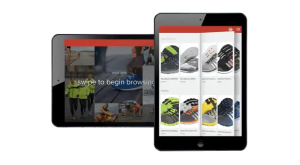
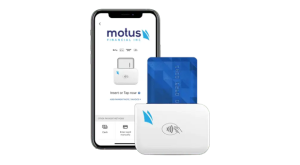
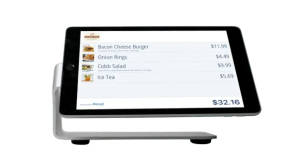 Our POS systems are designed to streamline in-store transactions. With features like inventory management, sales reporting, and customer tracking, our POS solutions help you run your business more efficiently. Our terminals are compatible with various payment methods, including chip cards, contactless payments, and mobile wallets.